Gantt Chart: Free Online Maker with Critical Path
Build a Gantt chart online for free — no sign-up. Learn what a Gantt chart is, how to read the bars, dependencies and slack, and see a fully solved 14-activity project turned into a timeline with its critical path highlighted.
Guide
What is a Gantt chart?
A Gantt chart is a horizontal bar chart that shows a project schedule over time. Each activity is a bar: its position marks when the task starts and ends, and its length is the duration.
At a glance it answers three questions: what runs when, what overlaps, and what must finish before the project can end. Bars are linked by dependency arrows, and the longest chain of tasks with no slack — the critical path — defines the shortest possible project duration.
Anatomy of a Gantt chart
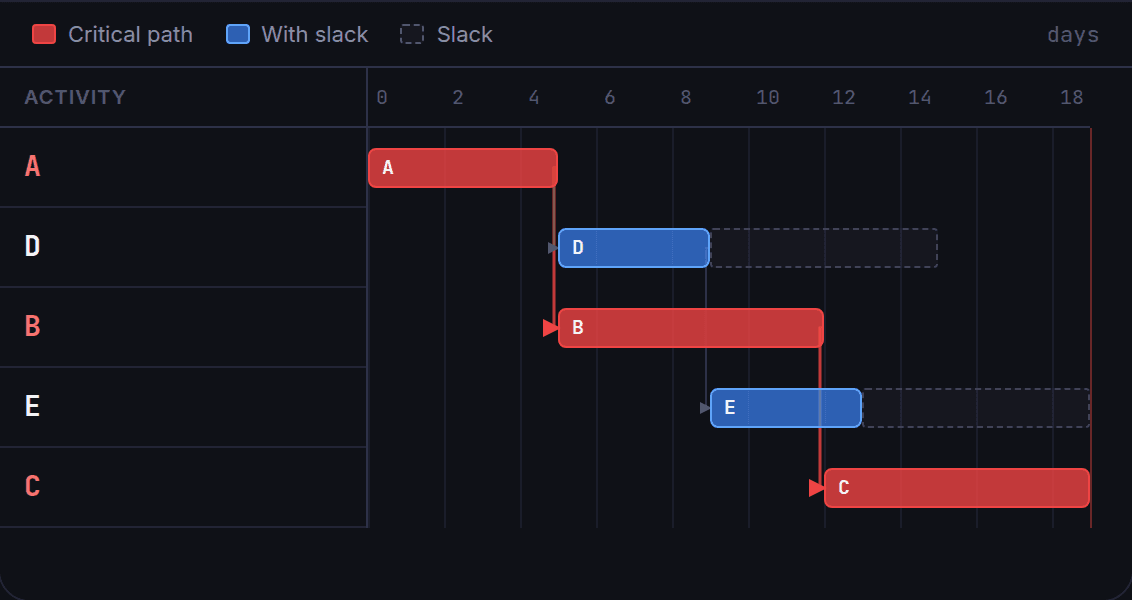
Every Gantt chart is built from five elements. The mini-chart below shows three activities: X and Y run in parallel, then Z follows both.
How to make a Gantt chart
You only need three things per activity — the tool does the scheduling math for you.
Gantt chart vs. critical path (CPM)
A Gantt chart and a CPM network diagram are two views of the same schedule. CPM computes the earliest and latest start/finish of each task and finds the critical path; the Gantt plots those results on a timeline.
In this tool the Gantt is generated directly from the CPM result, so the red bars are exactly the critical activities — you get both for free from the same activity list.
Worked Example
Residential Construction — 14 Activities
The same project from our PERT/CPM guide, now drawn as a Gantt chart: 44 days total, with the critical path in red and the slack of every flexible task shown as a dashed tail.
Critical Path — 44 days total
These activities have zero slack. Any delay on them pushes back the delivery date.
The Project as a Gantt Chart
Each bar runs from its Early Start to its Early Finish. The dashed tail is the slack (up to the Late Finish). Arrows are dependencies. Red = critical path.
Schedule Summary
Start, finish, duration and slack for every activity.
| Activity | ES | EF | LF | Duration | Slack | Critical? |
|---|---|---|---|---|---|---|
| AEscavação | 0 | 2 | 2 | 2 | 0 | ✓ Critical |
| BFundação | 2 | 6 | 6 | 4 | 0 | ✓ Critical |
| CParedes | 6 | 16 | 16 | 10 | 0 | ✓ Critical |
| DTelhado | 16 | 22 | 26 | 6 | 4 | — |
| EEnc. Exterior | 16 | 20 | 20 | 4 | 0 | ✓ Critical |
| FEnc. Interior | 20 | 25 | 25 | 5 | 0 | ✓ Critical |
| GMuros | 22 | 29 | 33 | 7 | 4 | — |
| HPintura Ext. | 29 | 38 | 42 | 9 | 4 | — |
| IInst. Elétrica | 16 | 23 | 25 | 7 | 2 | — |
| JDivisórias | 25 | 33 | 33 | 8 | 0 | ✓ Critical |
| KPiso | 33 | 37 | 38 | 4 | 1 | — |
| LPintura Int. | 33 | 38 | 38 | 5 | 0 | ✓ Critical |
| MAcabamento Ext. | 38 | 40 | 44 | 2 | 4 | — |
| NAcabamento Int. | 38 | 44 | 44 | 6 | 0 | ✓ Critical |
Frequently Asked Questions
Is this Gantt chart maker free?▾
Yes — completely free and no sign-up required. It runs entirely in your browser and your projects are saved locally.
What is the difference between a Gantt chart and a PERT/CPM diagram?▾
A PERT/CPM diagram shows activities as a network of nodes with dependencies and computes the critical path. A Gantt chart shows the same schedule as horizontal bars on a timeline. This tool generates both from the same data, so they always match.
How does the Gantt chart show the critical path?▾
Activities with zero slack are drawn as red bars connected by red arrows. That chain is the critical path — the sequence of tasks that determines the total project duration.
Can I export my Gantt chart?▾
You can export the project as CSV or PERT JSON, and the network diagram as a PNG image. The activity data behind the Gantt travels with the export.
Build your Gantt chart now
Add your activities, set dependencies, and get an instant Gantt with the critical path — free and no sign-up.